You Sell on Amazon. Here Is What AI Agents Would Actually Do for You
AllHub Team··15 min read
A buyer looks at your listing for ninety seconds. They want to know whether it fits a 55 mm rail, whether the grey is warm or cold, and whether it will arrive before Friday. Two of those answers are somewhere in your bullets, the third is on the delivery estimate, and none of them is where the buyer is looking. So they do what everybody does: they go back to the results page and open somebody else's listing. You never find out the question existed.
Amazon gives you traffic and keeps the customer. That is the deal, and it is not going to change. What has changed is that you can now put a second surface in front of the same catalogue — one that answers questions in your words, that you can send people to yourself, and that costs you no extra stock, no second warehouse and no new photography.
And that surface is one of several agents that read the same connection: one answers your buyers, the rest answer you — your numbers, your competitors' prices, next week's demand, your market, your reputation. This article is all of it in plain terms: what you connect, what each agent does for somebody selling on Amazon specifically, what none of them will ever do inside Amazon, and what it costs. If you have been pitched repricers, review tools and rank trackers for years, none of that is what this is.
What You Connect, and What Comes Across
You connect your Amazon seller account the same way you connect any other tool: an official authorisation screen, on Amazon, where you approve read access. No passwords are typed anywhere else, and you can withdraw it whenever you want.
What comes across is your own catalogue — the listings you sell, with their titles, bullet points, images, your offer price and the units behind them, whether they sit in your own warehouse or in Amazon's. Your orders come across too, so the assistant knows what has been bought and what is moving.
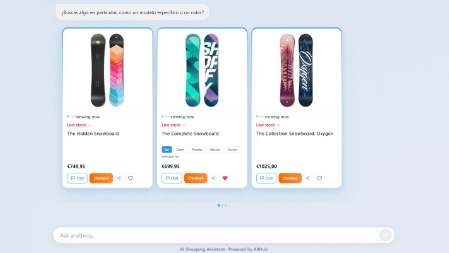
What comes out of that is a conversational storefront: a page where somebody types a question in their own words and gets an answer built from your listings, with the products that match, their prices, and a way through to buy. It lives at a link that belongs to you.
The same conversational storefront, on a phone and on desktop — one agent, every screen.
One thing to be clear about from the start, because it decides everything else in this article: nothing can be installed inside an Amazon listing. Amazon does not allow anybody to put software on its pages, and it never will. So the assistant does not live on Amazon. It lives on a link, and you decide where that link goes.
Three Situations, Three Ways to Use It
Sellers arrive in one of three shapes, and the useful answer is different for each. Find yourself here.
You sell only on Amazon and have no website
This is the case people assume is a bad fit, and it is the one where the difference is biggest. You have never had anywhere to send traffic. A link to your Amazon storefront is a wall of thumbnails with no way to ask anything; a link to a single listing throws away every other product you sell.
Here, the assistant is your website. One link, your whole catalogue behind it, and a buyer who can ask "which of these works with a 55 mm rail" and get a real answer instead of a search box. Where sellers put that link:
The bio on Instagram, TikTok or YouTube, where you are allowed exactly one link and it currently goes nowhere useful.
Replies and DMs — somebody asks about sizing under a post and instead of typing the same paragraph for the fortieth time you send the link, and they ask it themselves.
A QR code on the packaging insert, which is the one place you already have a customer's full attention and almost nobody uses for anything but a review request.
Email and newsletters, including the list you have been collecting and never had a destination for.
Paid traffic you would rather not send straight into a listing where the first thing a buyer sees is four competitors in the carousel underneath.
The buyer browses, asks, compares, saves what they like — and when they decide, the product opens on Amazon and they buy there, with their Prime account, their saved card and their trust in the checkout. You are not asking anybody to buy from a stranger. You are asking them to ask a question first.
You sell on Amazon and you have your own store
If you have a Shopify, WooCommerce or Wix store, connect that one. Not because Amazon matters less, but because your own store is where the money is taken: the assistant sits on your site, answers there, and sends the buyer to your own checkout, with your margin instead of a marketplace fee.
Your own store also carries the text that makes the answers good. Listings are written for a marketplace search box; product pages are written for a person. The assistant answers as well as the material it is given.
Sellers in this shape often ask whether they should connect both. Keep it simple: connect the storefront where the buyer pays, and use the link for what your own site cannot do — the bio, the DMs, the packaging insert. Two catalogues in one conversation is how a shopper ends up seeing two prices for the same product, and that costs more trust than the extra coverage is worth.
FBA, FBM, and several marketplaces
How you fulfil does not change what the assistant does, but it does change how sure it can be about stock. If you ship yourself, the units are the ones you declared on the listing. If Amazon ships for you, the units are the ones in their warehouses, and both are read for you. When Amazon will not tell us a number — it happens, depending on what you have authorised — the assistant says nothing about stock rather than guessing. It never invents "in stock".
The same restraint applies to price. Your price is read from your listing, and if you use a repricer it moves faster than any tool can follow, so the card says out loud that price and stock are confirmed on Amazon. The buyer sees the real number one click later — and the assistant has already told them that is where it settles. Nobody feels misled, which is the entire point.
Selling in Spain, France and Italy is three marketplaces. Start with the one that carries your volume: the assistant answers in the buyer's language regardless, but prices and stock belong to the marketplace they were read from, and mixing them would be worse than starting with one.
What It Actually Answers
Everything it says comes from your own catalogue. That is a limitation and it is also why it is worth having: it cannot invent a specification you never wrote, and it will not send somebody to a product you do not sell.
Pre-sale questions — sizes, materials, compatibility, what is in the box. The questions that decide a purchase and that a listing answers in the ninth bullet nobody reads.
"Which one for me" — a buyer describing a situation rather than a product, and getting the two or three of yours that fit, with the difference between them explained.
Comparisons inside your own range, which is the conversation you would have in a shop and cannot have on a marketplace.
A wishlist the buyer builds while browsing and can share with somebody else — a partner, a colleague, whoever is actually paying.
Questions in the buyer's own language, which for a seller shipping across Europe is the difference between a sale and a bounce.
And it answers at 23:00 on a Sunday, which is when a large part of retail happens and when neither you nor anybody you could hire is going to reply.
The Storefront Is One of Several
Everything above is one agent — the one your buyers talk to. The same connection feeds the rest, and those do not talk to buyers at all. They talk to you. You are not connecting a chat widget; you are connecting a catalogue once and getting a set of tools that read it.
Store Brain — your numbers, on WhatsApp
Ask your own store a question in plain language and get the answer, the chart, and what to do about it. What sold last week, which product went quiet, how a line is doing against the month before. On WhatsApp or Telegram, which matters more than it sounds: the questions you actually have about your business turn up while you are away from the desk, and by the time you are back you have stopped caring.
For an Amazon seller it replaces the tab you open, the date range you set, the export you download and the spreadsheet you build once and then abandon.
The same question you would export a spreadsheet for, asked in a sentence
Collector — the competitor price alert
You pick one of your products and the competing listings you care about, and the agent watches those pages. When one moves — a price drop, a new offer, a change in the listing — it pings you on WhatsApp or Telegram the moment it happens, not in a weekly digest.
It watches the pages you choose, which is the difference between a signal and a firehose: the three rivals who actually take your sales, not every seller on the ASIN. And it stops there. It does not reprice for you, because a tool that changes your prices while you sleep is a tool that can lose you money while you sleep. You get the alert; the decision stays yours.
What an alert looks like when a watched competitor drops below you
Demand Forecast — the restock you keep getting wrong
It reads your sales history, your stock and the seasonal shape of your own numbers, and tells you what is likely to sell next week, per product and per category — with a stockout alert before the shelf empties rather than after.
If you send stock into FBA, this is the agent with the clearest money attached to it. Every seller knows the two failures: the line that goes out of stock in the middle of its best fortnight and comes back with its ranking gone, and the pallet of the other thing sitting in a warehouse collecting storage fees. Both are the same missing forecast.
The warning that arrives before the shelf empties, not after
Researcher — the market reading you never get round to
A weekly market research report in your inbox, with its sources cited and every claim fact-checked before it is written down. Not a scrape of headlines: something you can act on, and check.
This is the work with no deadline, so it never happens — what is moving in your category, which product types are appearing, what the competition is doing that is not a price. It is the difference between running a catalogue and running a business, and it is the first thing that goes when the day is full.
Reputation Intelligence — and the honest limit on it
It connects your review sources, watches them continuously, and tells you the moment a new review lands — with the sentiment trend over time and a drafted reply you can edit before posting.
Now the part a competitor would leave out, and the reason this is the one agent that may do nothing for you: it cannot read anything on Amazon. No official API exists for customer reviews or for seller feedback — not even for your own ASINs — and the only way to get them is scraping, which breaks Amazon's terms and we will not do it. If somebody sells you Amazon review monitoring, ask them where the data comes from before you connect anything to your account.
What it does read is the reputation you hold outside the marketplace: Google Business Profile and Trustpilot, plus product reviews from a connected WooCommerce or Wix store. So be straight with yourself about which you have. If Amazon is your only channel and you are on neither of those, every other agent starts working the day you connect and this one waits until you have something for it to watch. We would rather say that here than have you find it out inside the product.
That pattern runs through all of them and is worth naming once: where the data exists officially, we read it; where it does not, we say so instead of finding a way around it. Your seller account is the asset. No feature is worth putting it at risk.
What It Will Never Do — Read This Part Twice
Most tools sold to Amazon sellers are vague about their limits until you have paid. Here they are up front, because every one of them is a thing you would otherwise assume.
It does not take payment. Ever. Buyers pay on Amazon, or on your own store's checkout. No money passes through us and no card details are handled anywhere near this.
It does not track orders. Once a buyer leaves for Amazon, the order, the delivery and the tracking are Amazon's — exactly as they are today. The assistant says so, so nobody comes back to it asking where their parcel is.
It does not touch your listings. It reads them. It does not edit titles, change prices, adjust inventory or publish anything to your account. Read access, and nothing written back.
It does not message buyers inside Amazon, does not answer Amazon Q&A, and does not respond to reviews. Anything that would put automated activity on your seller account is not something we do — your account is the asset, and no feature is worth risking it.
It does not reprice. Collector tells you a competitor moved. Changing your own price stays a decision you make.
It does not read your Amazon reviews — there is no official API for them, and we do not scrape. Reputation monitoring covers the sources that publish one.
It does not rank you — not in Amazon's search results, not in the Buy Box, and not inside anybody else's AI assistant. No tool can promise that, and the ones that do are selling you something else.
What is left after all that is small and specific: your catalogue, answering questions, at a link you control. That is the whole product. If it sounds narrow, it is — and it is the part of the funnel where you currently have nothing at all.
What You Get Out of It
A destination that belongs to you
Every link you have ever shared has sent someone into a marketplace that then showed them four competitors. This is the first one that does not. The comparison happens inside your own range, with your own words framing it, and the only exit is your product.
The questions themselves
You find out what buyers actually ask before they buy — the recurring compatibility question, the size nobody understands, the objection that comes up in every third conversation. That is not analytics, it is your next bullet point, your next listing image, and occasionally your next product.
The forty-times-a-day question, answered once
If you already answer the same message every day, this is where it goes. Not because a machine writes a better answer than you — because you write it once, in your words, and it gets given at three in the morning without you.
One connection, every job
The catalogue is authorised once. After that the storefront answers buyers, Store Brain answers you, Collector watches the rivals you picked, the forecast tells you what to restock and the Researcher reads the market — all of it from that single connection, with Reputation joining as soon as you have a source outside Amazon for it to read. Bought separately they would be a subscription each, a login each and a pile of exports that never line up. This is one connection, and the agents are looking at the same data as each other.
A second surface at no extra stock cost
No new inventory, no second warehouse, no separate photography, no listings to maintain twice. The same catalogue, reachable a second way. And if you later open your own store, the same assistant moves onto it.
What It Costs and How Long Setup Takes
Setup is the authorisation screen on Amazon, and then your catalogue syncing while you get a coffee. There is nothing to design, nothing to host and nothing to install — for a seller with no website, that is the entire reason this is reachable at all.
On price: there is a free tier to start on, paid plans begin at single digits per month, and there is a prepaid credit option for sellers who would rather not commit monthly. Every plan carries every agent — what changes with the tier is how much of each you use in a month, not which ones you are allowed. Plans go live soon, and early-access founders get three months free — which is the honest answer to "what if it does not work for my catalogue": try it on your own listings for a quarter and decide with your own numbers.
One account holds one store, deliberately. Your catalogue, your conversations and your billing stay one thing rather than a pile you have to keep untangled.
Stored data lives in the EU, and a privacy filter blocks personal data before it reaches any AI model. Full erasure on request under GDPR Article 17. If you sell into Europe, that is one fewer conversation to have with anybody.
How to Try It Without Risking Anything
The test that tells you something is not "does the AI work". It is whether your buyers ask it anything. Four steps:
Connect Amazon and let the catalogue sync. Read access only — you can withdraw it from your seller account at any moment.
Ask it the three questions you are tired of answering. If it cannot answer one of them, that is not a failure of the tool: it means the answer is not in your listings, which is worth knowing on its own.
Put the link in one place — the bio, or the next packaging insert. One place, so you can tell whether it did anything.
Ask Store Brain one thing you would normally export a spreadsheet for — that is the fastest way to find out whether the connection actually understands your catalogue.
Point Collector at the two competing listings that take your sales, and see what the alerts feel like in a week.
Read what people asked after two weeks. That list is the return on this whether or not a single extra sale shows up in the same fortnight.
If after that the answer is no, you have lost an afternoon and learned what your listings do not say. That is a cheap experiment by the standards of anything else you have been sold.
You are not going to stop selling on Amazon, and nothing here suggests you should. But the buyer who had one question and did not ask it is a sale you lose without ever seeing it happen. Giving that question somewhere to go — in your words, from your catalogue, at a link that is yours — costs you an afternoon and no inventory at all. Ask for early access and try it on the listings you already have.
Your next customer will probably ask an assistant before they ask you. By the time they reach your product page the comparison is already over — and it happened without you. Here is what decides whether your store was in it.
At first glance it is easy to think: great, another chat popup that will not understand me. But the technology has made a definitive leap — from answering questions to actually selling.
You do not need a demand planner to stop running out of your bestseller. You need three columns of history, one method you understand, and a rule for when to reorder.