How can you share your conversational store on your website, WhatsApp and social media?
AllHub Team··5 min read
A conversational store does not have to live only inside your website. Share it with a link, open it from a button or embed it as a widget, so customers can find products by talking from the channel they already use.
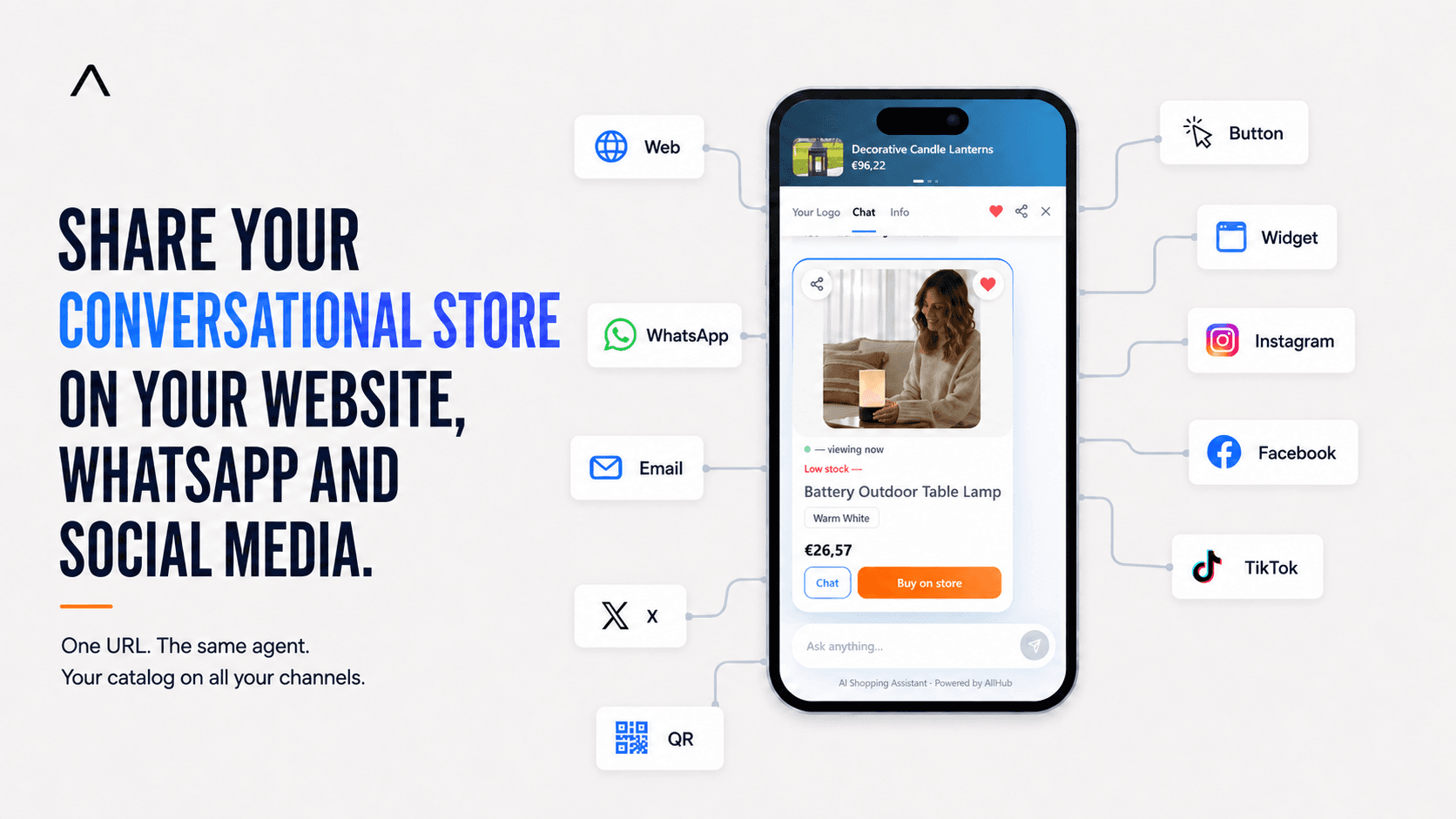
You configure one experience connected to your catalogue and distribute the same conversational store URL wherever your customers already are: WhatsApp, Instagram, TikTok, Facebook, X, email or a QR code. On your own website, the same experience can appear as a standalone page, button or floating widget.
AI-generated content
One conversational store can serve every approved channel without creating a separate experience for each one.
What does sharing a conversational store mean?
Sharing means giving customers direct access to a shopping agent that helps them find products through natural conversation. A shopper opens it, explains what they need and receives suggestions from your catalogue. You are not sending products into social networks: the store is the source and each channel is an entry point to that experience.
The direction matters: the conversational store is the source, and each channel is simply a place from which a shopper can open it.
One conversational store can serve every approved channel without creating a separate experience for each one.
Which sharing format should you choose?
Use a direct link outside your website, a button at a specific decision point or a widget that remains available while customers browse.
How can you add it to your website or landing page?
Your website can offer a dedicated conversational page, a button or a widget. The choice depends on how prominent you want the experience to be and how customers navigate: a page gives it centre stage, a button opens it at a precise decision point and a widget keeps it available throughout the visit.
Where can you share your conversational store?
How can you share it through WhatsApp Business?
To share your catalogue on WhatsApp, place the link in a message, quick reply, status or another WhatsApp Business location that supports URLs. The shopper taps it and continues the product search in the conversational experience instead of receiving a long sequence of catalogue explanations in chat.
WhatsApp is useful because many product questions already begin there. Instead of describing an entire catalog through messages, send the shopper to an experience designed for discovery and comparison.
How can you add it to an email campaign?
Use the conversational store link as linked text or the destination of a campaign button in tools such as Klaviyo or Mailchimp. An email about a new collection can invite people to find the right product instead of sending every recipient to the same category. Explain the benefit clearly: they can describe a need, resolve questions and receive relevant products.
Present the benefit, not the technology: shoppers can describe what they need, ask questions, and receive relevant products.
Where can you share it on Instagram?
Put your conversational store on social media through profile links, posts or campaigns wherever Instagram, Facebook, TikTok or X allows a URL.
How can you use it on Facebook?
On Facebook, place the URL in a profile, post, button, or link-enabled campaign so shoppers can narrow their search without browsing the whole catalog.
How can you share it on TikTok?
On TikTok, use it in the profile or any format that accepts a URL. Content creates interest; the conversation lets the shopper explain the need in detail.
What about X and other channels that accept links?
On X or another compatible channel, share the URL in a profile, pinned post, campaign, or message. You do not need a different agent for every network.
How can you use a QR code?
You can share the conversational store with a QR code in a physical shop, event, package or printed material. Scanning it opens the same experience on the customer’s phone and connects a physical touchpoint with your online catalogue.
How do all these entry points work together?
Combine a dedicated page, WhatsApp and social links, campaign buttons and QR codes while keeping the promise clear: customers can ask for help finding products.
Use a dedicated page when the experience should take center stage.
Add buttons where shoppers usually need guidance.
Install the widget when access should remain available while people browse your site.
Share the URL in the external channels where you already speak with customers.
What happens after a customer opens it?
The agent supports product discovery and helps prepare the selection. When the customer wants to buy, they continue to your store checkout. AllHub does not handle your money: your store collects payment, confirms the order and communicates tracking, so every part of the journey keeps a clear responsibility.
How do you install the widget?
Installing the conversational store widget takes three steps: copy the AllHub snippet, add it once in the correct platform location and publish the change. Then open the store in a private window to verify the version a new visitor will actually see.
Shopify: add the code in the theme location indicated by the guide.
WooCommerce: use your theme area or your usual code-insertion tool.
Wix: add it from Custom Code settings.
Custom website: place it before the closing body tag as instructed.
Do not paste the same snippet in several places. A duplicate installation can display more than one button or open the interface twice.
What widget size should you choose?
Choose compact, standard or large according to your design, then check the result on desktop and mobile.
What should you check before publishing?
The link opens the correct store.
The button or widget does not cover important controls.
Only one widget instance appears.
The copy beside the link clearly explains what the customer can do.
Keyboard navigation and focus still work.
What can you check if the widget does not work?
If it does not appear, confirm that the code is published and is not inside a block the platform removes. A blank page may point to site security restrictions; duplicate buttons usually mean the snippet was installed twice; an overlap with another control requires a position adjustment. Test again in a private window and on a real phone.
After every change, test in a private window and on a real phone so cached content is not mistaken for the experience a new customer will see.
Who controls the store and the purchase?
Your catalogue remains yours. Sharing the conversational store does not replace your website or commerce platform: you decide where access appears and can remove a link or widget whenever you want. Checkout, payment, order management and tracking remain in your store.
In summary: one experience, many entry points
To share a conversational store, use its URL in WhatsApp, email and social media, turn it into a QR code, open it from a button or embed its widget.
Your conversational store is the starting point. Your website, WhatsApp, Instagram, Facebook, TikTok, X, email, and QR codes are the different ways to bring it closer to customers.
We build the AI agent team that sells, supports and grows ecommerce stores — EU-hosted, GDPR-first.
This article was created with the help of AI and reviewed by our team. We take great care over every post and every translation, but the odd mistake can still slip through. If you find one, write to us: you will be helping us improve.
Yes. A comparison can use correct facts and still reach a harmful conclusion when it ignores audience, positioning or the reason behind each difference.

 AI-generated content